
Announcing CRM Syncs
Announcing Dreamdata CRM Syncs for HubSpot and Salesforce!
This new feature automatically pushes all of Dreamdata's rich engagement data, AI signals, and audiences straight into your CRM.
Now, Marketing can activate insights from Dreamdata within HubSpot and Salesforce, while Sales gets a real-time view of who’s engaged and ready to talk.
This sync powers automated Sales and SDR workflows, enabling smarter sales conversations, while giving them a clearer view of account engagement in the platforms they use every day.
Contents:
Bringing Engagement & Intent Insights to the Sales Frontline
Bringing Engagement & Intent Data to Your CRM
Dreamdata already empowers B2B marketers with the most complete map of the B2B customer journey anywhere. This gives you visibility into every single touchpoint an account makes as they progress through the sales funnel.
This data is an absolute goldmine.
Marketers can accurately measure and show the impact of their activities at every stage of the funnel.
But you don’t just want to report, you need to act.
We’ve built Dreamdata to put marketers in the driver’s seat, letting you activate your GTM data without requiring help from data teams or Ops.
How?
Identifying in-market accounts and targeting them on all major ad platforms through direct Audience Syncs.
Triggering timely outreach via tools like Clay and Zapier using Webhooks.
Enabling Sales with those same insights through Notifications in Slack and Microsoft Teams showing true buying intent.
Now, that same activation expands directly into the CRM.
With CRM Syncs, marketers can take it one step further and bring activation to HubSpot and Salesforce, putting accurate engagement insights right where Sales already works, every day.
Introducing CRM Syncs
CRM Syncs empowers Marketing to continuously activate engagement data and intent signals from Dreamdata directly in HubSpot and Salesforce.
This ensures your CRM is always powered by the latest data, your way.
How It Works: Your Data, Your Rules
CRM Syncs run automatically after every data model update, ensuring your CRM properties are continuously up to date with the latest insights from Dreamdata.
You decide exactly what to sync.
Map Dreamdata properties to any standard or custom properties in your HubSpot or Salesforce instance.
What can you sync?
Contact-level data
Contact information: First name, last name, country, phone number, role, seniority, title.
Engagement data: Number of sessions in the last 30 days.
Signals: Signals shown in the last 7 and 30 days.
Audience membership: The Dreamdata audiences the contact belongs to.
Dreamdata contact journey: Direct URL to the contact’s journey in Dreamdata.
Company- level data
Firmographic information: Company name, country, industry, number of employees and annual revenue.
Engagement data: Engagement Score, number of sessions in the last 30 days, and active contacts in the last 30 days.
Signals: Signals shown in the last 7 and 30 days.
Audience membership: The Dreamdata audiences the account belongs to.
LinkedIn engagement and impressions: Paid and organic impressions and engagement insights in the last 30 days.
LinkedIn URL: Direct URL to the LinkedIn Company Page.
Dreamdata customer journey: Direct URL to the account's customer journey in Dreamdata Dreamdata company journey.
Read the full CRM Syncs documentation.
How to Use CRM Syncs
Create an engagement scoring model that fits your GTM
Your Engagement Score starts in Dreamdata, where our AI engine scans all your GTM data to surface the intent signals that actually correlate with revenue.
You decide which signals to include, shaping a score that reflects how your buyers behave, not generic best practices.
Once built, your Custom Engagement Score can be synced directly to HubSpot or Salesforce through CRM Syncs.
Use it on its own or combine it with third-party intent to create a more advanced scoring model.
No black-box scoring, no one-size-fits-all intent feeds.
Transparent, flexible, and built on your own trusted customer journey data, giving Marketing full ownership of how engagement is defined and shared across the GTM team.
Help sales prioritize their outreach
Once your Engagement Score and AI intent signals are synced to HubSpot or Salesforce, your Ops team can create clear, prioritized account lists for Sales.
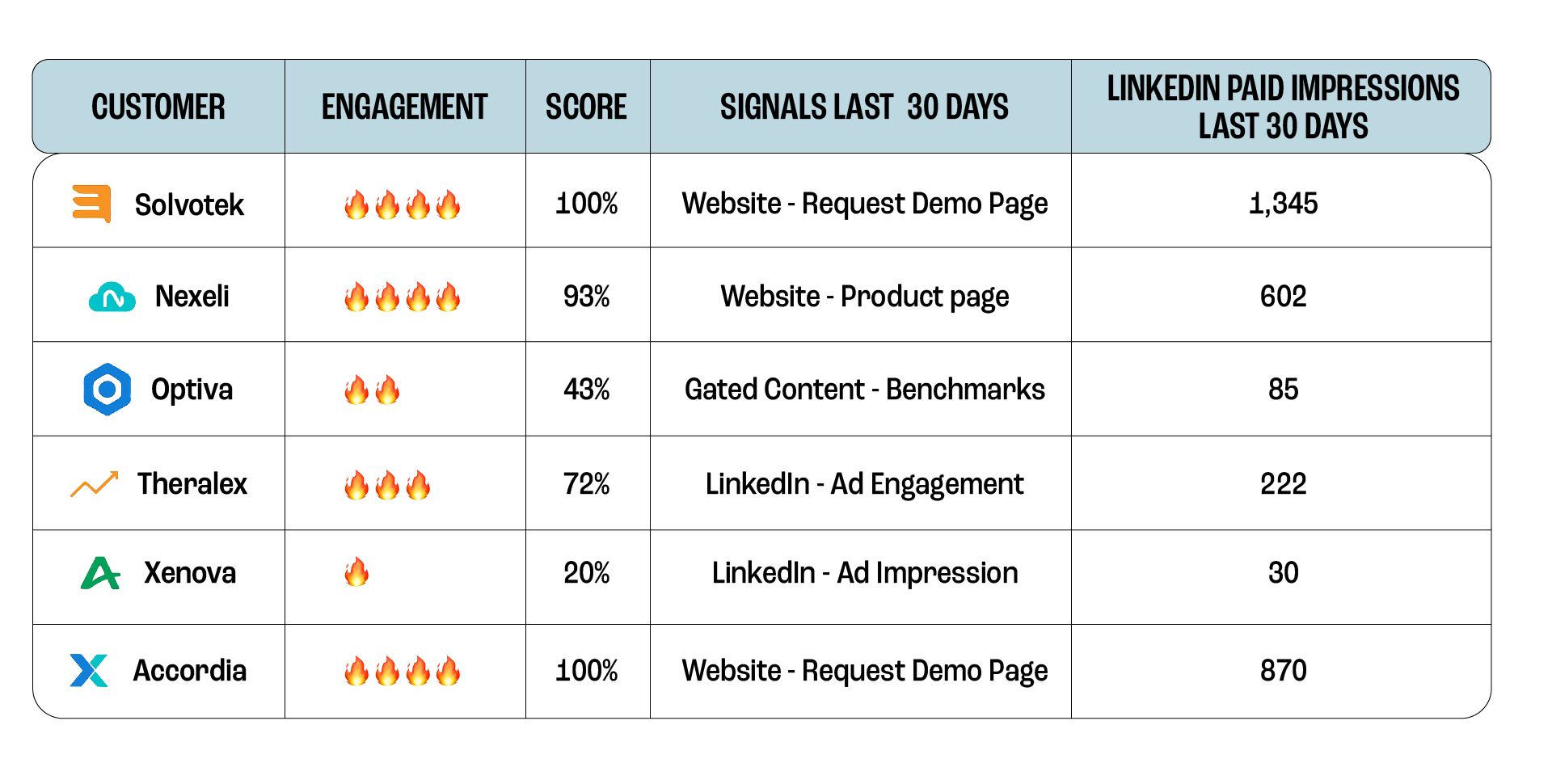
You can still keep Sales informed through Slack and Microsoft Teams notifications, but with CRM Syncs, they now have direct visibility into the most engaged accounts right inside their CRM.
Now, Sales reps can open their CRM to see a clear list of “cold,” “warm,” or “hot” accounts. And use this to prioritize, plan, and personalize their outreach using the engagement data that Marketing shared.
Trigger Automated GTM Workflows in Your CRM
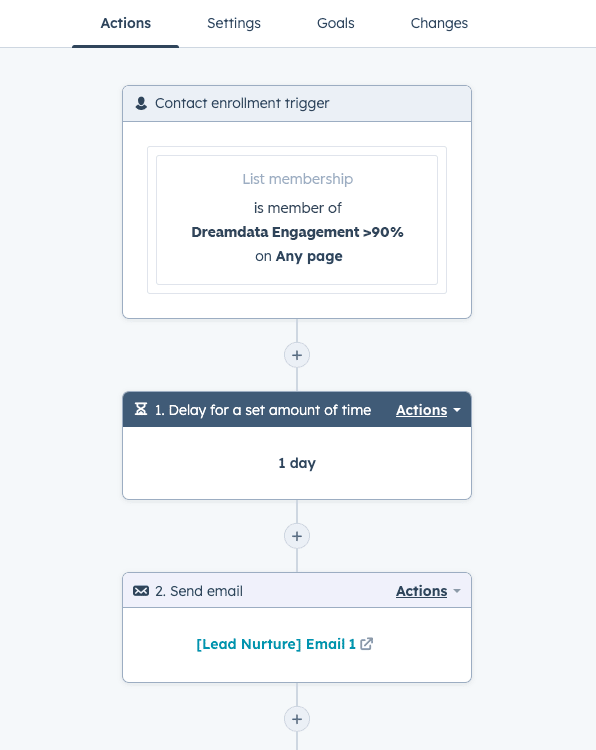
One of the most powerful parts of having accurate engagement data and intent signals in your CRM is using them as a trigger for native automation.
Once synced, the Dreamdata Engagement Score and intent signals (e.g. LinkedIn organic engagement in the last 30 days) become a new weapon in your workflow arsenal.
Use these insights to automate actions like:
Creating a follow-up task for an SDR when an account's score hits a certain threshold.
Enrolling accounts in a sales sequence when they engage with a key campaign.
Un-enrolling prospects from nurture flows when they show strong intent.
Have your own CRM Syncs use cases? Tell us about them.
How to Get Started With CRM Syncs
We’ve added CRM Syncs to the Dreamdata Activation Product, joining our existing notifications, webhooks and audience syncs features.
Now you can put your GTM data to work across every channel, turning your marketing team from a reporting hub into an action driving engine.
Check out our detailed documentation to get started:
